|
V
A
M
|
the
Virtual
Alpha
Micro
|
Sample VAM install (in Ubuntu)
Annotated log of a VAM install on a fresh Ubuntu distro.
Purple is prompt/input. Black is output.
Green is google input/response.
  1: mike@PX13:~$ sudo apt update
  2: [sudo: authenticate] Password:
  3: Hit:1 http://security.ubuntu.com/ubuntu resolute-security InRelease
  4: Hit:2 http://archive.ubuntu.com/ubuntu resolute InRelease
  5: Hit:3 http://archive.ubuntu.com/ubuntu resolute-updates InRelease
  6: Hit:4 http://archive.ubuntu.com/ubuntu resolute-backports InRelease
  7: All packages are up to date.
  8: mike@PX13:~$ sudo apt upgrade
  9: Summary:
 10:   Upgrading: 0, Installing: 0, Removing: 0, Not Upgrading: 0
>>>>>> As above 1-10, it's a good idea to update/upgrade a system before installing a new product.
 11: mike@PX13:~$ curl -O "https://kicksfortso.com/Vam68/vam-2611.tgz"
 12:   % Total    % Received % Xferd  Average Speed  Time    Time    Time   Current
 13:                                  Dload  Upload  Total   Spent   Left   Speed
     ...
 14: 100 199.9M 100 199.9M   0      0  8.50M      0   00:23   00:23          7.85M
>>>>>> Above 11-14, download VAM
 15: mike@PX13:~$ tar -zxf vam-2611.tgz
 16: mike@PX13:~$ ls
 17: vam  vam-2611.tgz
 18: mike@PX13:~$ cd vam
 19: mike@PX13:~/vam$ ls
 20: DOC  HDAs  am100  am1200  amSame  readme
>>>>>> Above 15-20, untar VAM and briefly inspect the new directory(s)
21: mike@PX13:~/vam$ cd am100
21.5: cp makefile-normal makefile
>>>>>> Above 21, 21.5, cd into the new vam/am100 directory and copy makefile-normal
to makefile. makefile-normal is the default but you should know about this step in
case you're following this as an example for a termux or macos install.
 22: mike@PX13:~/vam/am100$ make
 23: Command 'make' not found, but can be installed with:
 24: sudo apt install make        # version 4.4.1-3, or
 25: sudo apt install make-guile  # version 4.4.1-3
>>>>>> Above 22-25, the make failed 'cause make isn't installed! But it was kind
enough to tell use how to proceed, so...
 26: mike@PX13:~/vam/am100$ sudo apt install make
 27: Installing:
 28:   make
 29:
 30: Suggested packages:
 31:   make-doc
 32:
 33: Summary:
 34:   Upgrading: 0, Installing: 1, Removing: 0, Not Upgrading: 0
 35:   Download size: 197 kB
 36:   Space needed: 451 kB / 1023 GB available
 37:
 38: Get:1 http://archive.ubuntu.com/ubuntu resolute/main amd64 make amd64 4.4.1-3 [197 kB]
 39: Fetched 197 kB in 1s (218 kB/s)
 40: Selecting previously unselected package make.
 41: (Reading database ... 35974 files and directories currently installed.)
 42: Preparing to unpack .../make_4.4.1-3_amd64.deb ...
 43: Unpacking make (4.4.1-3) ...
 44: Setting up make (4.4.1-3) ...
 45: Processing triggers for man-db (2.13.1-1build1) ...
>>>>>> Above 26-45, make installed so run it again...
 46: mike@PX13:~/vam/am100$ make
 47: gcc -DVERSION=26.11 -Dwd16 -fcommon -O0 -ggdb -Wfatal-errors -Wall -o main.o -c main.c
 48: make: gcc: No such file or directory
 49: make: *** [makefile:84: main.o] Error 127
>>>>>> Above 46-49, this time it's missing gcc, so we'll take a chance and just try
to install that...
 50: mike@PX13:~/vam/am100$ sudo apt install gcc
 51: Installing:
 52:   gcc
 53:
 54: Installing dependencies:
 55:   cpp                      gcc-15-base              libc6-dev      libisl23      libtsan2
 56:   cpp-15                   gcc-15-x86-64-linux-gnu  libcc1-0       libitm1       libubsan1
 57:   cpp-15-x86-64-linux-gnu  gcc-x86-64-linux-gnu     libgcc-15-dev  liblsan0      linux-libc-dev
 58:   cpp-x86-64-linux-gnu     libasan8                 libgomp1       libmpc3       manpages-dev
 59:   gcc-15                   libc-dev-bin             libhwasan0     libquadmath0  rpcsvc-proto
 60:
 61: Suggested packages:
 62:   cpp-doc         gcc-multilib  libtool  gdb              gcc-15-doc            glibc-doc
 63:   gcc-15-locales  autoconf      flex     gcc-doc          gdb-x86-64-linux-gnu
 64:   cpp-15-doc      automake      bison    gcc-15-multilib  libc-devtools
 65:
 66: Summary:
 67:   Upgrading: 0, Installing: 26, Removing: 0, Not Upgrading: 0
 68:   Download size: 59.6 MB
 69:   Space needed: 200 MB / 1023 GB available
 70:
 71: Continue? [Y/n] y
 72: Get:1 http://archive.ubuntu.com/ubuntu resolute/main amd64 gcc-15-base amd64 15.2.0-16ubuntu1 [39.0 kB]
 73: Get:2 http://archive.ubuntu.com/ubuntu resolute/main amd64 libisl23 amd64 0.27-1build1 [691 kB]
 74: Get:3 http://archive.ubuntu.com/ubuntu resolute/main amd64 libmpc3 amd64 1.3.1-3 [54.6 kB]
 75: Get:4 http://archive.ubuntu.com/ubuntu resolute/main amd64 cpp-15-x86-64-linux-gnu amd64 15.2.0-16ubuntu1 [12.9 MB]
 76: Get:5 http://archive.ubuntu.com/ubuntu resolute/main amd64 cpp-15 amd64 15.2.0-16ubuntu1 [1030 B]
 77: Get:6 http://archive.ubuntu.com/ubuntu resolute/main amd64 cpp-x86-64-linux-gnu amd64 4:15.2.0-5ubuntu1 [5840 B]
 78: Get:7 http://archive.ubuntu.com/ubuntu resolute/main amd64 cpp amd64 4:15.2.0-5ubuntu1 [22.4 kB]
 79: Get:8 http://archive.ubuntu.com/ubuntu resolute/main amd64 libcc1-0 amd64 16-20260322-1ubuntu1 [51.2 kB]
 80: Get:9 http://archive.ubuntu.com/ubuntu resolute/main amd64 libgomp1 amd64 16-20260322-1ubuntu1 [162 kB]
 81: Get:10 http://archive.ubuntu.com/ubuntu resolute/main amd64 libitm1 amd64 16-20260322-1ubuntu1 [30.0 kB]
 82: Get:11 http://archive.ubuntu.com/ubuntu resolute/main amd64 libasan8 amd64 16-20260322-1ubuntu1 [3184 kB]
 83: Get:12 http://archive.ubuntu.com/ubuntu resolute/main amd64 liblsan0 amd64 16-20260322-1ubuntu1 [1394 kB]
 84: Get:13 http://archive.ubuntu.com/ubuntu resolute/main amd64 libtsan2 amd64 16-20260322-1ubuntu1 [2849 kB]
 85: Get:14 http://archive.ubuntu.com/ubuntu resolute/main amd64 libubsan1 amd64 16-20260322-1ubuntu1 [1240 kB]
 86: Get:15 http://archive.ubuntu.com/ubuntu resolute/main amd64 libhwasan0 amd64 16-20260322-1ubuntu1 [1731 kB]
 87: Get:16 http://archive.ubuntu.com/ubuntu resolute/main amd64 libquadmath0 amd64 16-20260322-1ubuntu1 [155 kB]
 88: Get:17 http://archive.ubuntu.com/ubuntu resolute/main amd64 libgcc-15-dev amd64 15.2.0-16ubuntu1 [2866 kB]
 89: Get:18 http://archive.ubuntu.com/ubuntu resolute/main amd64 gcc-15-x86-64-linux-gnu amd64 15.2.0-16ubuntu1 [25.4 MB]
 90: Get:19 http://archive.ubuntu.com/ubuntu resolute/main amd64 gcc-15 amd64 15.2.0-16ubuntu1 [539 kB]
 91: Get:20 http://archive.ubuntu.com/ubuntu resolute/main amd64 gcc-x86-64-linux-gnu amd64 4:15.2.0-5ubuntu1 [1208 B]
 92: Get:21 http://archive.ubuntu.com/ubuntu resolute/main amd64 gcc amd64 4:15.2.0-5ubuntu1 [5010 B]
 93: Get:22 http://archive.ubuntu.com/ubuntu resolute-updates/main amd64 libc-dev-bin amd64 2.43-2ubuntu2.4 [23.3 kB]
 94: Get:23 http://archive.ubuntu.com/ubuntu resolute-updates/main amd64 linux-libc-dev amd64 7.0.0-38.38 [1715 kB]
 95: Get:24 http://archive.ubuntu.com/ubuntu resolute/main amd64 rpcsvc-proto amd64 1.4.3-1build1 [68.3 kB]
 96: Get:25 http://archive.ubuntu.com/ubuntu resolute-updates/main amd64 libc6-dev amd64 2.43-2ubuntu2.4 [2294 kB]
 97: Get:26 http://archive.ubuntu.com/ubuntu resolute/main amd64 manpages-dev all 6.17-1 [2183 kB]
 98: Fetched 59.6 MB in 6s (10.4 MB/s)
 99: Selecting previously unselected package gcc-15-base:amd64.
100: (Reading database ... 35992 files and directories currently installed.)
101: Preparing to unpack .../00-gcc-15-base_15.2.0-16ubuntu1_amd64.deb ...
102: Unpacking gcc-15-base:amd64 (15.2.0-16ubuntu1) ...
103: Selecting previously unselected package libisl23:amd64.
104: Preparing to unpack .../01-libisl23_0.27-1build1_amd64.deb ...
105: Unpacking libisl23:amd64 (0.27-1build1) ...
106: Selecting previously unselected package libmpc3:amd64.
107: Preparing to unpack .../02-libmpc3_1.3.1-3_amd64.deb ...
108: Unpacking libmpc3:amd64 (1.3.1-3) ...
109: Selecting previously unselected package cpp-15-x86-64-linux-gnu.
110: Preparing to unpack .../03-cpp-15-x86-64-linux-gnu_15.2.0-16ubuntu1_amd64.deb ...
111: Unpacking cpp-15-x86-64-linux-gnu (15.2.0-16ubuntu1) ...
112: Selecting previously unselected package cpp-15.
113: Preparing to unpack .../04-cpp-15_15.2.0-16ubuntu1_amd64.deb ...
114: Unpacking cpp-15 (15.2.0-16ubuntu1) ...
115: Selecting previously unselected package cpp-x86-64-linux-gnu.
116: Preparing to unpack .../05-cpp-x86-64-linux-gnu_4%3a15.2.0-5ubuntu1_amd64.deb ...
117: Unpacking cpp-x86-64-linux-gnu (4:15.2.0-5ubuntu1) ...
118: Selecting previously unselected package cpp.
119: Preparing to unpack .../06-cpp_4%3a15.2.0-5ubuntu1_amd64.deb ...
120: Unpacking cpp (4:15.2.0-5ubuntu1) ...
121: Selecting previously unselected package libcc1-0:amd64.
122: Preparing to unpack .../07-libcc1-0_16-20260322-1ubuntu1_amd64.deb ...
123: Unpacking libcc1-0:amd64 (16-20260322-1ubuntu1) ...
124: Selecting previously unselected package libgomp1:amd64.
125: Preparing to unpack .../08-libgomp1_16-20260322-1ubuntu1_amd64.deb ...
126: Unpacking libgomp1:amd64 (16-20260322-1ubuntu1) ...
127: Selecting previously unselected package libitm1:amd64.
128: Preparing to unpack .../09-libitm1_16-20260322-1ubuntu1_amd64.deb ...
129: Unpacking libitm1:amd64 (16-20260322-1ubuntu1) ...
130: Selecting previously unselected package libasan8:amd64.
131: Preparing to unpack .../10-libasan8_16-20260322-1ubuntu1_amd64.deb ...
132: Unpacking libasan8:amd64 (16-20260322-1ubuntu1) ...
133: Selecting previously unselected package liblsan0:amd64.
134: Preparing to unpack .../11-liblsan0_16-20260322-1ubuntu1_amd64.deb ...
135: Unpacking liblsan0:amd64 (16-20260322-1ubuntu1) ...
136: Selecting previously unselected package libtsan2:amd64.
137: Preparing to unpack .../12-libtsan2_16-20260322-1ubuntu1_amd64.deb ...
138: Unpacking libtsan2:amd64 (16-20260322-1ubuntu1) ...
139: Selecting previously unselected package libubsan1:amd64.
140: Preparing to unpack .../13-libubsan1_16-20260322-1ubuntu1_amd64.deb ...
141: Unpacking libubsan1:amd64 (16-20260322-1ubuntu1) ...
142: Selecting previously unselected package libhwasan0:amd64.
143: Preparing to unpack .../14-libhwasan0_16-20260322-1ubuntu1_amd64.deb ...
144: Unpacking libhwasan0:amd64 (16-20260322-1ubuntu1) ...
145: Selecting previously unselected package libquadmath0:amd64.
146: Preparing to unpack .../15-libquadmath0_16-20260322-1ubuntu1_amd64.deb ...
147: Unpacking libquadmath0:amd64 (16-20260322-1ubuntu1) ...
148: Selecting previously unselected package libgcc-15-dev:amd64.
149: Preparing to unpack .../16-libgcc-15-dev_15.2.0-16ubuntu1_amd64.deb ...
150: Unpacking libgcc-15-dev:amd64 (15.2.0-16ubuntu1) ...
151: Selecting previously unselected package gcc-15-x86-64-linux-gnu.
152: Preparing to unpack .../17-gcc-15-x86-64-linux-gnu_15.2.0-16ubuntu1_amd64.deb ...
153: Unpacking gcc-15-x86-64-linux-gnu (15.2.0-16ubuntu1) ...
154: Selecting previously unselected package gcc-15.
155: Preparing to unpack .../18-gcc-15_15.2.0-16ubuntu1_amd64.deb ...
156: Unpacking gcc-15 (15.2.0-16ubuntu1) ...
157: Selecting previously unselected package gcc-x86-64-linux-gnu.
158: Preparing to unpack .../19-gcc-x86-64-linux-gnu_4%3a15.2.0-5ubuntu1_amd64.deb ...
159: Unpacking gcc-x86-64-linux-gnu (4:15.2.0-5ubuntu1) ...
160: Selecting previously unselected package gcc.
161: Preparing to unpack .../20-gcc_4%3a15.2.0-5ubuntu1_amd64.deb ...
162: Unpacking gcc (4:15.2.0-5ubuntu1) ...
163: Selecting previously unselected package libc-dev-bin.
164: Preparing to unpack .../21-libc-dev-bin_2.43-2ubuntu2.4_amd64.deb ...
165: Unpacking libc-dev-bin (2.43-2ubuntu2.4) ...
166: Selecting previously unselected package linux-libc-dev:amd64.
167: Preparing to unpack .../22-linux-libc-dev_7.0.0-38.38_amd64.deb ...
168: Unpacking linux-libc-dev:amd64 (7.0.0-38.38) ...
169: Selecting previously unselected package rpcsvc-proto.
170: Preparing to unpack .../23-rpcsvc-proto_1.4.3-1build1_amd64.deb ...
171: Unpacking rpcsvc-proto (1.4.3-1build1) ...
172: Selecting previously unselected package libc6-dev:amd64.
173: Preparing to unpack .../24-libc6-dev_2.43-2ubuntu2.4_amd64.deb ...
174: Unpacking libc6-dev:amd64 (2.43-2ubuntu2.4) ...
175: Selecting previously unselected package manpages-dev.
176: Preparing to unpack .../25-manpages-dev_6.17-1_all.deb ...
177: Unpacking manpages-dev (6.17-1) ...
178: Setting up manpages-dev (6.17-1) ...
179: Setting up linux-libc-dev:amd64 (7.0.0-38.38) ...
180: Setting up libgomp1:amd64 (16-20260322-1ubuntu1) ...
181: Setting up rpcsvc-proto (1.4.3-1build1) ...
182: Setting up libquadmath0:amd64 (16-20260322-1ubuntu1) ...
183: Setting up libmpc3:amd64 (1.3.1-3) ...
184: Setting up libubsan1:amd64 (16-20260322-1ubuntu1) ...
185: Setting up libhwasan0:amd64 (16-20260322-1ubuntu1) ...
186: Setting up libasan8:amd64 (16-20260322-1ubuntu1) ...
187: Setting up libtsan2:amd64 (16-20260322-1ubuntu1) ...
188: Setting up libisl23:amd64 (0.27-1build1) ...
189: Setting up libc-dev-bin (2.43-2ubuntu2.4) ...
190: Setting up gcc-15-base:amd64 (15.2.0-16ubuntu1) ...
191: Setting up libcc1-0:amd64 (16-20260322-1ubuntu1) ...
192: Setting up liblsan0:amd64 (16-20260322-1ubuntu1) ...
193: Setting up libitm1:amd64 (16-20260322-1ubuntu1) ...
194: Setting up libgcc-15-dev:amd64 (15.2.0-16ubuntu1) ...
195: Setting up cpp-15-x86-64-linux-gnu (15.2.0-16ubuntu1) ...
196: Setting up gcc-15-x86-64-linux-gnu (15.2.0-16ubuntu1) ...
197: Setting up cpp-15 (15.2.0-16ubuntu1) ...
198: Setting up libc6-dev:amd64 (2.43-2ubuntu2.4) ...
199: Setting up cpp-x86-64-linux-gnu (4:15.2.0-5ubuntu1) ...
200: Setting up gcc-x86-64-linux-gnu (4:15.2.0-5ubuntu1) ...
201: Setting up gcc-15 (15.2.0-16ubuntu1) ...
202: Setting up cpp (4:15.2.0-5ubuntu1) ...
203: Setting up gcc (4:15.2.0-5ubuntu1) ...
204: Processing triggers for man-db (2.13.1-1build1) ...
205: Processing triggers for libc-bin (2.43-2ubuntu2.4) ...
>>>>>> Above 50-205 - that was kinda wordy! - but now gcc is installed so try make again...
206: mike@PX13:~/vam/am100$ make
207: gcc -DVERSION=26.11 -Dwd16 -fcommon -O0 -ggdb -Wfatal-errors -Wall -o main.o -c main.c
208: In file included from whichvam.h:9,
209:                  from main.c:30:
210: am100.h:46:10: fatal error: ncurses.h: No such file or directory
211:    46 | #include
212:       |          ^~~~~~~~~~~
213: compilation terminated.
214: make: *** [makefile:84: main.o] Error 1
>>>>>> Above 206-214 - now it's ncurses
215: mike@PX13:~/vam/am100$ sudo apt install ncurses
216: Error: Unable to locate package ncurses
>>>>>> Above 215-216 - no, that wan't it, lets see if google can help
217: mike@PX13:~/vam/am100$ # google - where is ncurses in ubuntu
218: mike@PX13:~/vam/am100$ # google - sudo apt install libncurses-dev
>>>>>> Above 217-218 - ok, let's try that
219: mike@PX13:~/vam/am100$ sudo apt install libncurses-dev
220: Installing:
221:   libncurses-dev
222:
223: Installing dependencies:
224:   libncurses6
225:
226: Suggested packages:
227:   ncurses-doc
228:
229: Summary:
230:   Upgrading: 0, Installing: 2, Removing: 0, Not Upgrading: 0
231:   Download size: 503 kB
232:   Space needed: 2780 kB / 1023 GB available
233:
234: Continue? [Y/n] y
235: Get:1 http://archive.ubuntu.com/ubuntu resolute/main amd64 libncurses6 amd64 6.6+20251231-1 [114 kB]
236: Get:2 http://archive.ubuntu.com/ubuntu resolute/main amd64 libncurses-dev amd64 6.6+20251231-1 [389 kB]
237: Fetched 503 kB in 1s (697 kB/s)
238: Selecting previously unselected package libncurses6:amd64.
239: (Reading database ... 40733 files and directories currently installed.)
240: Preparing to unpack .../libncurses6_6.6+20251231-1_amd64.deb ...
241: Unpacking libncurses6:amd64 (6.6+20251231-1) ...
242: Selecting previously unselected package libncurses-dev:amd64.
243: Preparing to unpack .../libncurses-dev_6.6+20251231-1_amd64.deb ...
244: Unpacking libncurses-dev:amd64 (6.6+20251231-1) ...
245: Setting up libncurses6:amd64 (6.6+20251231-1) ...
246: Setting up libncurses-dev:amd64 (6.6+20251231-1) ...
247: Processing triggers for man-db (2.13.1-1build1) ...
248: Processing triggers for libc-bin (2.43-2ubuntu2.4) ...
>>>>>> Above 217-218 - time to try another make
249: mike@PX13:~/vam/am100$ make
250: gcc -DVERSION=26.11 -Dwd16 -fcommon -O0 -ggdb -Wfatal-errors -Wall -o main.o -c main.c
251: gcc -DVERSION=26.11 -Dwd16 -fcommon -O0 -ggdb -Wfatal-errors -Wall -o config.o -c config.c
252: gcc -DVERSION=26.11 -Dwd16 -fcommon -O0 -ggdb -Wfatal-errors -Wall -o wd16.o -c wd16.c
253: gcc -DVERSION=26.11 -Dwd16 -fcommon -O0 -ggdb -Wfatal-errors -Wall -o fmt1.o -c fmt1.c
254: gcc -DVERSION=26.11 -Dwd16 -fcommon -O0 -ggdb -Wfatal-errors -Wall -o fmt2.o -c fmt2.c
255: gcc -DVERSION=26.11 -Dwd16 -fcommon -O0 -ggdb -Wfatal-errors -Wall -o fmt3.o -c fmt3.c
256: gcc -DVERSION=26.11 -Dwd16 -fcommon -O0 -ggdb -Wfatal-errors -Wall -o fmt4.o -c fmt4.c
257: gcc -DVERSION=26.11 -Dwd16 -fcommon -O0 -ggdb -Wfatal-errors -Wall -o fmt5.o -c fmt5.c
258: gcc -DVERSION=26.11 -Dwd16 -fcommon -O0 -ggdb -Wfatal-errors -Wall -o fmt6.o -c fmt6.c
259: gcc -DVERSION=26.11 -Dwd16 -fcommon -O0 -ggdb -Wfatal-errors -Wall -o fmt7.o -c fmt7.c
260: gcc -DVERSION=26.11 -Dwd16 -fcommon -O0 -ggdb -Wfatal-errors -Wall -o fmt8.o -c fmt8.c
261: gcc -DVERSION=26.11 -Dwd16 -fcommon -O0 -ggdb -Wfatal-errors -Wall -o fmt9.o -c fmt9.c
262: gcc -DVERSION=26.11 -Dwd16 -fcommon -O0 -ggdb -Wfatal-errors -Wall -o fmt10.o -c fmt10.c
263: gcc -DVERSION=26.11 -Dwd16 -fcommon -O0 -ggdb -Wfatal-errors -Wall -o ddt.o -c ddt.c
264: gcc -DVERSION=26.11 -Dwd16 -fcommon -O0 -ggdb -Wfatal-errors -Wall -o trace.o -c trace.c
265: gcc -DVERSION=26.11 -Dwd16 -fcommon -O0 -ggdb -Wfatal-errors -Wall -o fnums.o -c fnums.c
266: gcc -DVERSION=26.11 -Dwd16 -fcommon -O0 -ggdb -Wfatal-errors -Wall -o logging.o -c logging.c
267: gcc -DVERSION=26.11 -Dwd16 -fcommon -O0 -ggdb -Wfatal-errors -Wall -o timer.o -c timer.c
268: gcc -DVERSION=26.11 -Dwd16 -fcommon -O0 -ggdb -Wfatal-errors -Wall -o io.o -c io.c
269: gcc -DVERSION=26.11 -Dwd16 -fcommon -O0 -ggdb -Wfatal-errors -Wall -o am320.o -c am320.c
270: gcc -DVERSION=26.11 -Dwd16 -fcommon -O0 -ggdb -Wfatal-errors -Wall -o am600.o -c am600.c
271: gcc -DVERSION=26.11 -Dwd16 -fcommon -O0 -ggdb -Wfatal-errors -Wall -o am300.o -c am300.c
272: gcc -DVERSION=26.11 -Dwd16 -fcommon -O0 -ggdb -Wfatal-errors -Wall -o ps3.o -c ps3.c
273: gcc -DVERSION=26.11 -Dwd16 -fcommon -O0 -ggdb -Wfatal-errors -Wall -o terms.o -c terms.c
274: gcc -DVERSION=26.11 -Dwd16 -fcommon -O0 -ggdb -Wfatal-errors -Wall -o localkb.o -c localkb.c
275: gcc -DVERSION=26.11 -Dwd16 -fcommon -O0 -ggdb -Wfatal-errors -Wall -o telnet.o -c telnet.c
276: gcc -DVERSION=26.11 -Dwd16 -fcommon -O0 -ggdb -Wfatal-errors -Wall -o front-panel.o -c front-panel.c
277: gcc -DVERSION=26.11 -Dwd16 -fcommon -O0 -ggdb -Wfatal-errors -Wall -o dialogs.o -c dialogs.c
278: gcc -DVERSION=26.11 -Dwd16 -fcommon -O0 -ggdb -Wfatal-errors -Wall -o memory.o -c memory.c
279: gcc -DVERSION=26.11 -Dwd16 -fcommon -O0 -ggdb -Wfatal-errors -Wall -o rom.o -c rom.c
280: gcc -DVERSION=26.11 -Dwd16 -fcommon -O0 -ggdb -Wfatal-errors -Wall -o ram.o -c ram.c
281: gcc -DVERSION=26.11 -Dwd16 -fcommon -O0 -ggdb -Wfatal-errors -Wall -o fmt11.o -c fmt11.c
282: gcc -DVERSION=26.11 -Dwd16 -fcommon -O0 -ggdb -Wfatal-errors -Wall -o hwassist.o -c hwassist.c
283: gcc -o am100 main.o config.o wd16.o fmt1.o fmt2.o fmt3.o fmt4.o fmt5.o fmt6.o fmt7.o fmt8.o fmt9.o fmt10.o ddt.o trace.o fnums.o logging.o timer.o io.o am320.o am600.o am300.o ps3.o terms.o localkb.o telnet.o front-panel.o dialogs.o memory.o rom.o ram.o fmt11.o hwassist.o -lm -lpthread -lncurses -lpanel -lmenu
284: gcc -o tapfil tapfil.c
285: gcc -o filtap filtap.c
286: gcc -o tapdir tapdir.c
287: gcc -o vdkclear vdkclear.c
288: gcc -o vdkcopy vdkcopy.c
289: gcc -o vdkshow vdkshow.c
290: gcc -o vdkxchg vdkxchg.c
>>>>>> Above 219-290 - finished am100 build, lets try it!
291: mike@PX13:~/vam/am100$ ./am100
292: am100 requires at least 24x80 screen, resize now or ^C
293: MAX lines: 25, MAX rows: 76
294: MAX lines: 25, MAX rows: 76
295: MAX lines: 25, MAX rows: 76
296: ^C
>>>>>> Above 291-296 - VAM is a full screen app (albeit text only) so it needs
a minimum 25x81 screen size. Try again after resize and after a few seconds and
several intermediate screens we see AMOS booted and waiting for our input!
297: mike@PX13:~/vam/am100$ ./am100
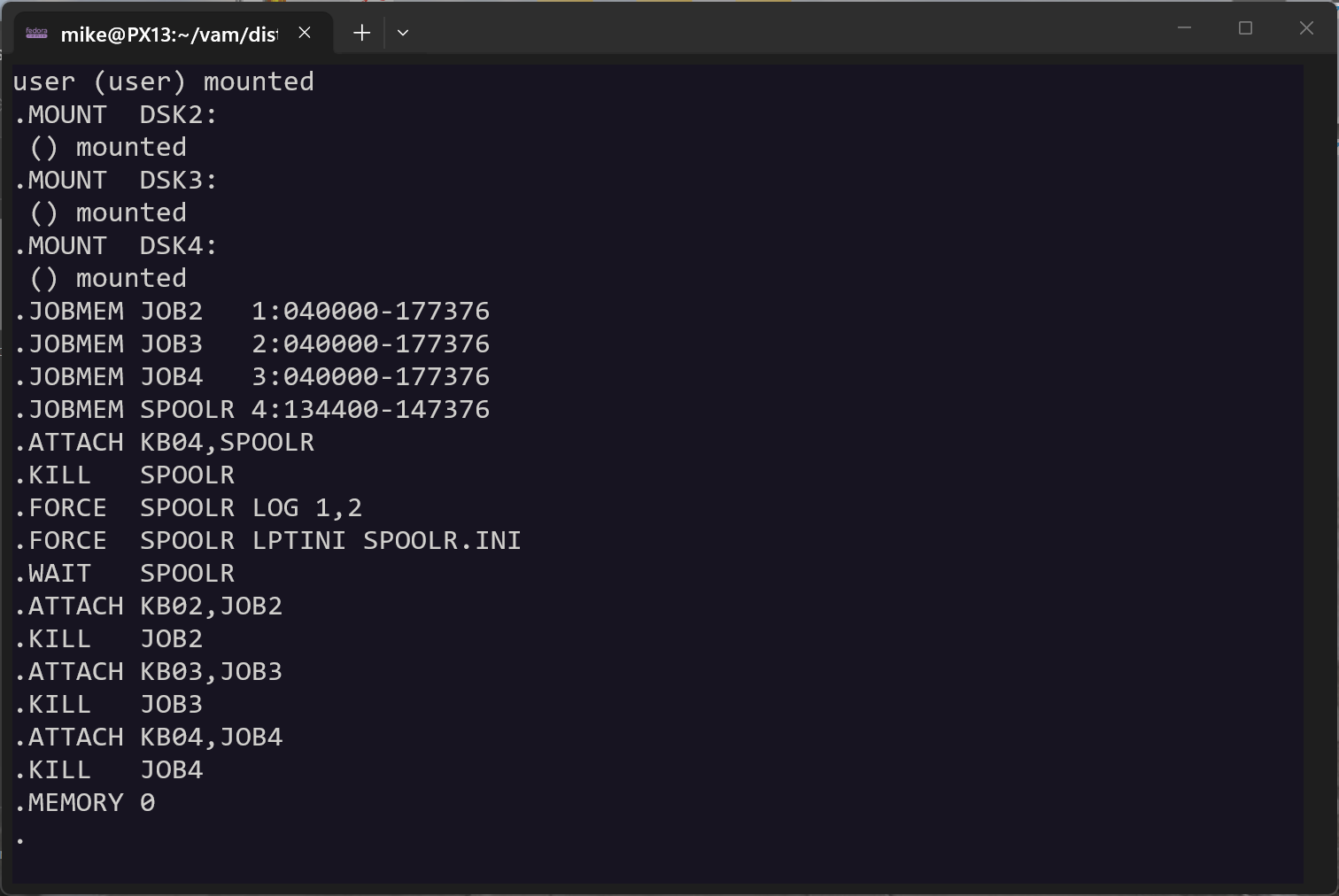
at his point you can type any AMOS input you want, for example "dir/w, CR" for
a listing of the DSK0:[1,4] directory (where system.ini leaves you after it
finishes). But for now lets just get out of VAM. Press ALT-F to get to the
front panel. For more information on use of ALT keys for screen switching and
other functions please see the "Operations" section.
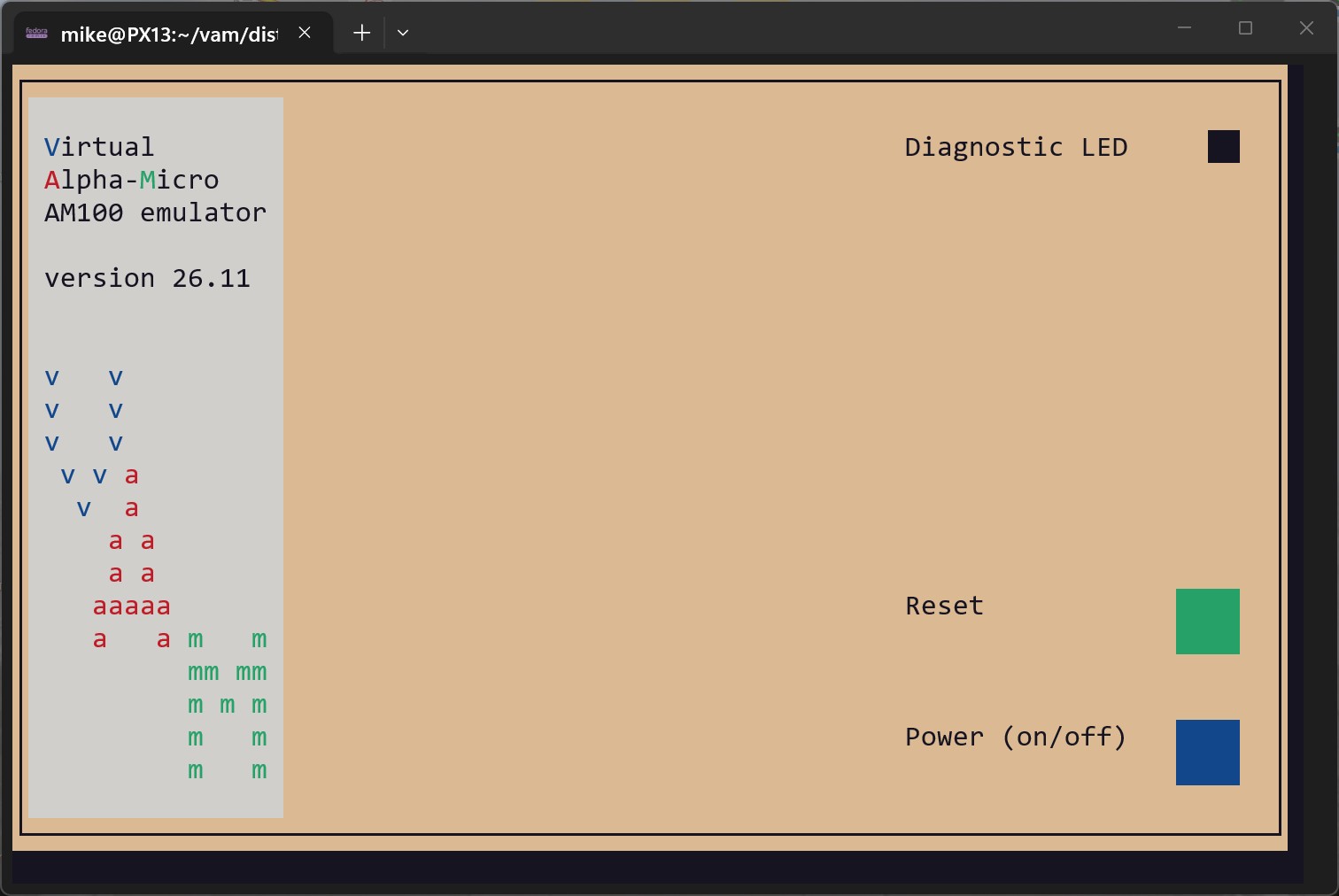
this is the front panel with the cursor on the "power" switch. press CR to see
a new dialog looking for a YES or NO response to "Are you sure you want to reboot now?"
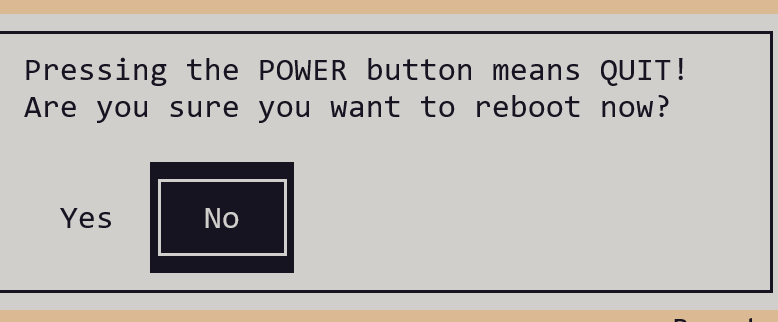
wheb you press "Y" (or left arrow key) the NO switches to YES. Press CR here to exit VAM.
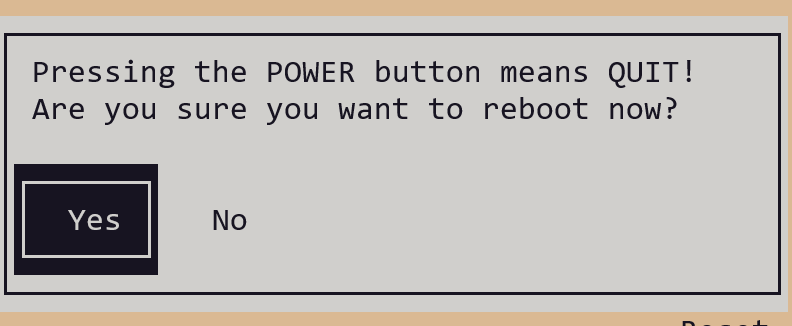
>>>>>> with the am100 version of VAM installed it's time to switch to the am1200
direcory to get it installed...
298: mike@PX13:~/vam/am100$ cd ../am1200
299: mike@PX13:~/vam/am1200$ make
300: gcc -DVERSION=26.11 -Dm68k -fcommon -O0 -ggdb -Wfatal-errors -Wall -o memory.o -c memory.c
301: gcc -DVERSION=26.11 -Dm68k -fcommon -O0 -ggdb -Wfatal-errors -Wall -o ram.o -c ram.c
302: gcc -DVERSION=26.11 -Dm68k -fcommon -O0 -ggdb -Wfatal-errors -Wall -o rom.o -c rom.c
303: gcc -DVERSION=26.11 -Dm68k -fcommon -O0 -ggdb -Wfatal-errors -Wall -o g1.o -c g1.c
304: gcc -DVERSION=26.11 -Dm68k -fcommon -O0 -ggdb -Wfatal-errors -Wall -o g2.o -c g2.c
305: gcc -DVERSION=26.11 -Dm68k -fcommon -O0 -ggdb -Wfatal-errors -Wall -o g5.o -c g5.c
306: gcc -DVERSION=26.11 -Dm68k -fcommon -O0 -ggdb -Wfatal-errors -Wall -o g6.o -c g6.c
307: gcc -DVERSION=26.11 -Dm68k -fcommon -O0 -ggdb -Wfatal-errors -Wall -o g7.o -c g7.c
308: gcc -DVERSION=26.11 -Dm68k -fcommon -O0 -ggdb -Wfatal-errors -Wall -o g8.o -c g8.c
309: gcc -DVERSION=26.11 -Dm68k -fcommon -O0 -ggdb -Wfatal-errors -Wall -o g9.o -c g9.c
310: gcc -DVERSION=26.11 -Dm68k -fcommon -O0 -ggdb -Wfatal-errors -Wall -o g10.o -c g10.c
311: gcc -DVERSION=26.11 -Dm68k -fcommon -O0 -ggdb -Wfatal-errors -Wall -o g11.o -c g11.c
312: gcc -DVERSION=26.11 -Dm68k -fcommon -O0 -ggdb -Wfatal-errors -Wall -o g12.o -c g12.c
313: gcc -DVERSION=26.11 -Dm68k -fcommon -O0 -ggdb -Wfatal-errors -Wall -o g13.o -c g13.c
314: gcc -DVERSION=26.11 -Dm68k -fcommon -O0 -ggdb -Wfatal-errors -Wall -o g14.o -c g14.c
315: gcc -DVERSION=26.11 -Dm68k -fcommon -O0 -ggdb -Wfatal-errors -Wall -o g15.o -c g15.c
316: gcc -DVERSION=26.11 -Dm68k -fcommon -O0 -ggdb -Wfatal-errors -Wall -o g16.o -c g16.c
317: gcc -DVERSION=26.11 -Dm68k -fcommon -O0 -ggdb -Wfatal-errors -Wall -o trace.o -c trace.c
318: gcc -DVERSION=26.11 -Dm68k -fcommon -O0 -ggdb -Wfatal-errors -Wall -o hwassist.o -c hwassist.c
319: gcc -DVERSION=26.11 -Dm68k -fcommon -O0 -ggdb -Wfatal-errors -Wall -o main.o -c main.c
320: gcc -DVERSION=26.11 -Dm68k -fcommon -O0 -ggdb -Wfatal-errors -Wall -o config.o -c config.c
321: gcc -DVERSION=26.11 -Dm68k -fcommon -O0 -ggdb -Wfatal-errors -Wall -o m68k.o -c m68k.c
322: gcc -DVERSION=26.11 -Dm68k -fcommon -O0 -ggdb -Wfatal-errors -Wall -o front-panel.o -c front-panel.c
323: gcc -DVERSION=26.11 -Dm68k -fcommon -O0 -ggdb -Wfatal-errors -Wall -o dialogs.o -c dialogs.c
324: gcc -DVERSION=26.11 -Dm68k -fcommon -O0 -ggdb -Wfatal-errors -Wall -o ma300.o -c ma300.c
325: gcc -DVERSION=26.11 -Dm68k -fcommon -O0 -ggdb -Wfatal-errors -Wall -o timer.o -c timer.c
326: gcc -DVERSION=26.11 -Dm68k -fcommon -O0 -ggdb -Wfatal-errors -Wall -o io.o -c io.c
327: gcc -DVERSION=26.11 -Dm68k -fcommon -O0 -ggdb -Wfatal-errors -Wall -o localkb.o -c localkb.c
328: gcc -DVERSION=26.11 -Dm68k -fcommon -O0 -ggdb -Wfatal-errors -Wall -o fnums.o -c fnums.c
329: gcc -DVERSION=26.11 -Dm68k -fcommon -O0 -ggdb -Wfatal-errors -Wall -o logging.o -c logging.c
330: gcc -DVERSION=26.11 -Dm68k -fcommon -O0 -ggdb -Wfatal-errors -Wall -o g11-fake.o -c g11-fake.c
331: gcc -DVERSION=26.11 -Dm68k -fcommon -O0 -ggdb -Wfatal-errors -Wall -o ssd.o -c ssd.c
332: gcc -DVERSION=26.11 -Dm68k -fcommon -O0 -ggdb -Wfatal-errors -Wall -o ddt.o -c ddt.c
333: gcc -DVERSION=26.11 -Dm68k -fcommon -O0 -ggdb -Wfatal-errors -Wall -o syscom.o -c syscom.c
334: gcc -DVERSION=26.11 -Dm68k -fcommon -O0 -ggdb -Wfatal-errors -Wall -o jcb.o -c jcb.c
335: gcc -DVERSION=26.11 -Dm68k -fcommon -O0 -ggdb -Wfatal-errors -Wall -o tcb.o -c tcb.c
336: gcc -DVERSION=26.11 -Dm68k -fcommon -O0 -ggdb -Wfatal-errors -Wall -o dumping.o -c dumping.c
337: gcc -DVERSION=26.11 -Dm68k -fcommon -O0 -ggdb -Wfatal-errors -Wall -o terms.o -c terms.c
338: gcc -DVERSION=26.11 -Dm68k -fcommon -O0 -ggdb -Wfatal-errors -Wall -o telnet.o -c telnet.c
339: gcc -o am1200 memory.o ram.o rom.o g1.o  g2.o g5.o  g6.o  g7.o  g8.o g9.o  g10.o g11.o g12.o g13.o g14.o g15.o g16.o trace.o hwassist.o main.o config.o m68k.o front-panel.o dialogs.o ma300.o timer.o io.o localkb.o fnums.o logging.o g11-fake.o ssd.o ddt.o syscom.o jcb.o tcb.o dumping.o terms.o telnet.o -lm -lz -lncurses  -lpanel -lmenu
340: /usr/bin/x86_64-linux-gnu-ld.bfd: cannot find -lz: No such file or directory
341: collect2: error: ld returned 1 exit status
342: make: *** [makefile:93: am1200] Error 1
>>>>>> Above 299-342 - wonder what an -lz is?
343: mike@PX13:~/vam/am1200$ # google - where is -lz in ubuntu
344: mike@PX13:~/vam/am1200$ # google - where is zlib in ubuntu
345: mike@PX13:~/vam/am1200$ # google - sudo apt install zlib1g  zlib1g-dev
>>>>>>> Above 343-345 - let's do their sudo...
346: mike@PX13:~/vam/am1200$ sudo apt install zlib1g zlib1g-dev
347: zlib1g is already the newest version (1:1.3.dfsg+really1.3.1-1ubuntu3.1).
348: zlib1g set to manually installed.
349: Installing:
350:   zlib1g-dev
351:
352: Summary:
353:   Upgrading: 0, Installing: 1, Removing: 0, Not Upgrading: 0
354:   Download size: 895 kB
355:   Space needed: 1356 kB / 1023 GB available
356:
357: Continue? [Y/n] y
358: Get:1 http://archive.ubuntu.com/ubuntu resolute-updates/main amd64 zlib1g-dev amd64 1:1.3.dfsg+really1.3.1-1ubuntu3.1 [895 kB]
359: Fetched 895 kB in 1s (764 kB/s)
360: Selecting previously unselected package zlib1g-dev:amd64.
361: (Reading database ... 40824 files and directories currently installed.)
362: Preparing to unpack .../zlib1g-dev_1%3a1.3.dfsg+really1.3.1-1ubuntu3.1_amd64.deb ...
363: Unpacking zlib1g-dev:amd64 (1:1.3.dfsg+really1.3.1-1ubuntu3.1) ...
364: Setting up zlib1g-dev:amd64 (1:1.3.dfsg+really1.3.1-1ubuntu3.1) ...
365: Processing triggers for man-db (2.13.1-1build1) ...
>>>>>> Above 346-365 - time to try another make
366: mike@PX13:~/vam/am1200$ make
367: gcc -o am1200 memory.o ram.o rom.o g1.o  g2.o g5.o  g6.o  g7.o  g8.o g9.o  g10.o g11.o g12.o g13.o g14.o g15.o g16.o trace.o hwassist.o main.o config.o m68k.o front-panel.o dialogs.o ma300.o timer.o io.o localkb.o fnums.o logging.o g11-fake.o ssd.o ddt.o syscom.o jcb.o tcb.o dumping.o terms.o telnet.o -lm -lz -lncurses  -lpanel -lmenu
368: gcc -DVERSION=26.11 -Dm68k -fcommon -O0 -ggdb -Wfatal-errors -Wall -o dis.o -c dis.c
369: gcc -o dis memory.o ram.o rom.o g1.o  g2.o g5.o  g6.o  g7.o  g8.o g9.o  g10.o g11.o g12.o g13.o g14.o g15.o g16.o trace.o hwassist.o dis.o -lm -lz -lncurses  -lpanel -lmenu
370: gcc -DVERSION=26.11 -Dm68k -fcommon -O0 -ggdb -Wfatal-errors -Wall -o tapfil tapfil.c
371: gcc -DVERSION=26.11 -Dm68k -fcommon -O0 -ggdb -Wfatal-errors -Wall -o filtap filtap.c
372: gcc -DVERSION=26.11 -Dm68k -fcommon -O0 -ggdb -Wfatal-errors -Wall -o tapdir tapdir.c
373: gcc -DVERSION=26.11 -Dm68k -fcommon -O0 -ggdb -Wfatal-errors -Wall -o vdkclear vdkclear.c
374: gcc -DVERSION=26.11 -Dm68k -fcommon -O0 -ggdb -Wfatal-errors -Wall -o vdkcopy vdkcopy.c
375: gcc -DVERSION=26.11 -Dm68k -fcommon -O0 -ggdb -Wfatal-errors -Wall -o vdkshow vdkshow.c
376: gcc -DVERSION=26.11 -Dm68k -fcommon -O0 -ggdb -Wfatal-errors -Wall -o vdkxchg vdkxchg.c
377: gcc -DVERSION=26.11 -Dm68k -fcommon -O0 -ggdb -Wfatal-errors -Wall -I/usr/include/json-c/ -o tst.o -c tst.c
378: tst.c:69:10: fatal error: json.h: No such file or directory
379:    69 | #include

380:       |          ^~~~~~~~
381: compilation terminated.
382: make: *** [makefile:90: tst.o] Error 1
>>>>>> Above 366-382 - now it's json
383: mike@PX13:~/vam/am1200$ # google - where is json-c in ubuntu
384: mike@PX13:~/vam/am1200$ # google - sudo apt install libjson-c-dev
>>>>>> Above 383-384 - do the json install
385: mike@PX13:~/vam/am1200$ sudo apt install libjson-c-dev
386: Installing:
387:   libjson-c-dev
388:
389: Summary:
390:   Upgrading: 0, Installing: 1, Removing: 0, Not Upgrading: 0
391:   Download size: 65.8 kB
392:   Space needed: 316 kB / 1023 GB available
393:
394: Get:1 http://archive.ubuntu.com/ubuntu resolute/main amd64 libjson-c-dev amd64 0.18+ds-3 [65.8 kB]
395: Fetched 65.8 kB in 0s (186 kB/s)
396: Selecting previously unselected package libjson-c-dev:amd64.
397: (Reading database ... 40856 files and directories currently installed.)
398: Preparing to unpack .../libjson-c-dev_0.18+ds-3_amd64.deb ...
399: Unpacking libjson-c-dev:amd64 (0.18+ds-3) ...
400: Setting up libjson-c-dev:amd64 (0.18+ds-3) ...
>>>>>> Above 385-400 - time to try another make
401: mike@PX13:~/vam/am1200$ make
402: gcc -DVERSION=26.11 -Dm68k -fcommon -O0 -ggdb -Wfatal-errors -Wall -I/usr/include/json-c/ -o tst.o -c tst.c
403: gcc -o tst memory.o ram.o rom.o g1.o  g2.o g5.o  g6.o  g7.o  g8.o g9.o  g10.o g11.o g12.o g13.o g14.o g15.o g16.o trace.o hwassist.o tst.o -lm -lz -lncurses -lpanel -lmenu -ljson-c
>>>>>> Above 401-403 - finished am1200 build, lets try it! First we'll
run the JSON instruction tests
404: mike@PX13:~/vam/am1200$ ./tstall
405: #!/bin/bash -v
406:
407: ./tst tom/th/ABCD.json.gz
408: ./tst tom/th/ADDA.l.json.gz
409: ./tst tom/th/ADDA.w.json.gz
410: ./tst tom/th/ADD.b.json.gz
411: ./tst tom/th/ADD.l.json.gz
412: ./tst tom/th/ADD.w.json.gz
413: ./tst tom/th/ADDX.b.json.gz
414: ./tst tom/th/ADDX.l.json.gz
415: ./tst tom/th/ADDX.w.json.gz
416: ./tst tom/th/AND.b.json.gz
417: ./tst tom/th/ANDItoCCR.json.gz
418: ./tst tom/th/ANDItoSR.json.gz
419: ./tst tom/th/AND.l.json.gz
420: ./tst tom/th/AND.w.json.gz
421: ./tst tom/th/ASL.b.json.gz
422:
423: PS bad, was 270A (9994), expected 2713 (10003)
424: D2 bad, was CDFB7FF8 (-839155720), expected 2E5E4304 (777929476)
425: sorted ram[0] OK , @ 000C04 (3076) was 1E (30), expected 1E (30)
426: sorted ram[1] OK , @ 000C05 (3077) was D0 (208), expected D0 (208)
427: test 1583 (e502 [ASL.b Q, D2]) failed!!!
428:
429: D2 bad, was 417C7EF4 (1098678004), expected 6461D390 (1684132752)
430: sorted ram[0] OK , @ 000C04 (3076) was 1D (29), expected 1D (29)
431: sorted ram[1] OK , @ 000C05 (3077) was 02 (2), expected 02 (2)
432: test 1761 (e502 [ASL.b Q, D2]) failed!!!
>>>>>>
>>>>>> Note ASL tests 1583 & 1761 are expected to fail - the tests themselves are documented bad!
>>>>>>
433:   ^C
434: mike@PX13:~/vam/am1200$ ./am1200
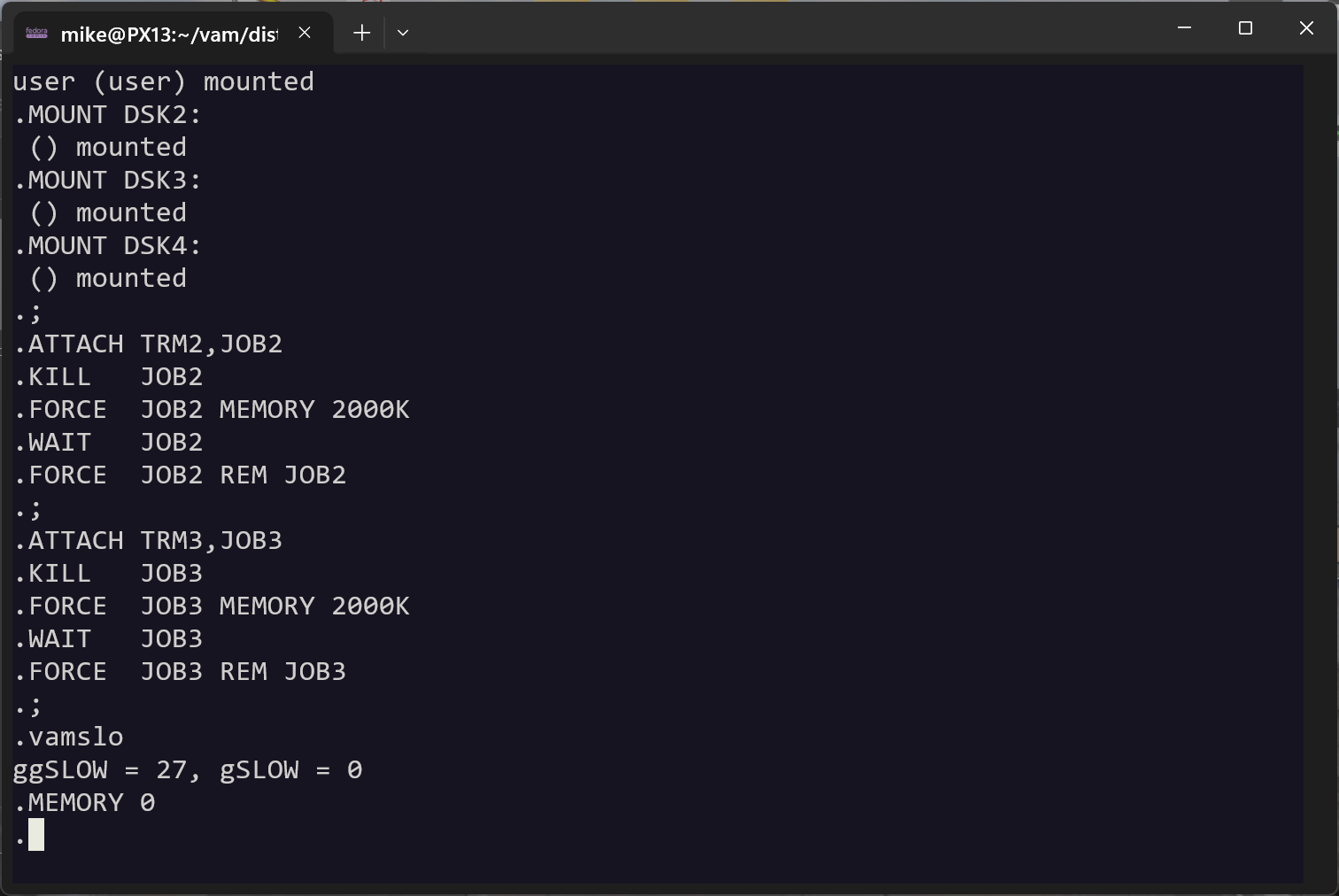
at his point you can type any AMOS/L input you want, for example "dir/w, CR" for
a listing of the DSK0:[1,4] directory (where amosl.ini leaves you after it
finishes). But for now lets just get out of VAM.
So just like the AM100 app, Press ALT-F now to get to the
front panel. For more information on use of ALT keys for screen switching and
other functions please see the "Operations" section.
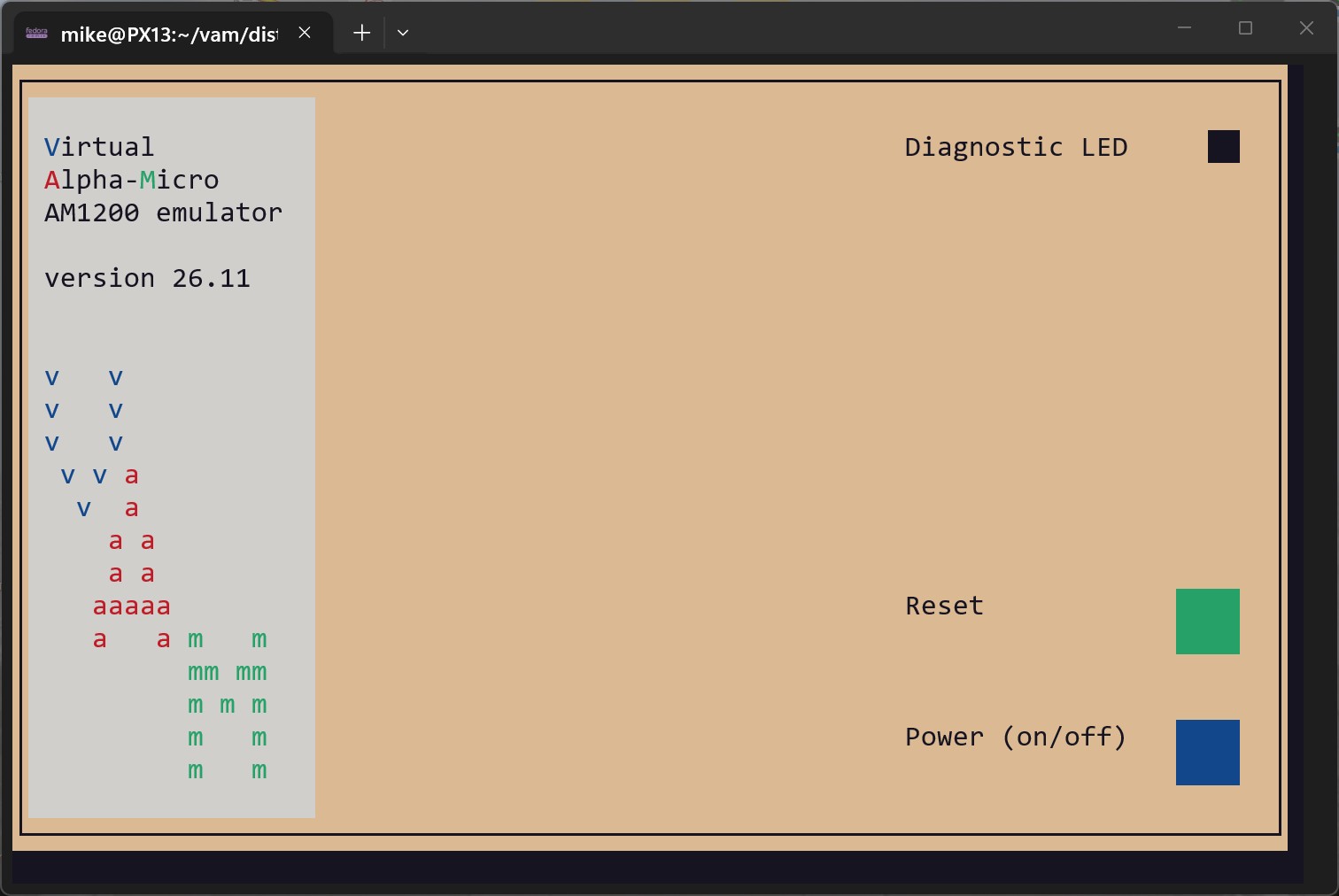
and here is the am1200 front panel, almost exactly like the am100 front panel,
with the cursor on the "power" switch. Press CR to see
a new dialog looking for a YES or NO response to "Are you sure you want to reboot now?"
435: mike@PX13:~/vam/am1200$ cd ../..
436: mike@PX13:~$ mv vam vam-2611
>>>>>> Above 435-436,
a final (optional) step. I like to rename the vam folder to match the tar file it
came from. that way when I install a new tar file it doesn't automatically
overwrite the old one!
Copyright © Mike Noel, 2002-2026; last updated 10/23/2026